
Onboarding Report
Go to Your Name > Reports > Onboarding Report
This report provides a centralized view of the onboarding status of your team.
You can use this report to check if the contact information and compliance status of your employees, students, and temporary workers are valid, as well as to monitor the utilization of the ConnectHQ mobile app.
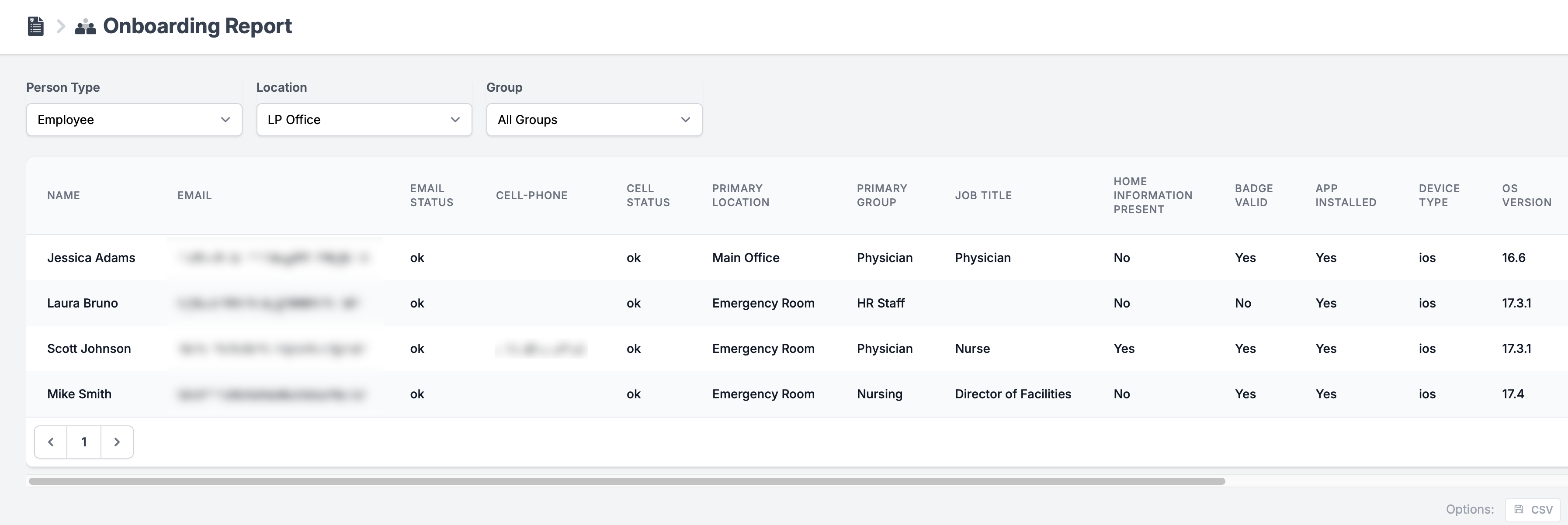
You will be able to see the following information for each user:
| Column | Additional details |
| Name | |
| Email Status | Whether or not the emails address is accepting emails. |
| Cell Phone | |
| Cell Status | Whether or not the cell phone is accepting SMS. |
| Primary Location | Learn more about Location assignment here. |
| Primary Group | Learn more about Groups here. |
| Job Title | Learn more about job titles and staffing levels here. |
| Home Information Present | Home addresses need to be present to include employees' and temporary workers' home addresses in disruption events Radar tracking. |
| Badge Valid | Shows if all the compliance checklist requirements are met and the badge is valid. |
| App Installed | Shows if the ConnectHQ or ClearToGo! app is installed. |
| Device type | Shows if the employee uses iOS or Android. |
| OS Version | Shows the version of the OS. |
| App Name | Shows if the ConnectHQ or ClearToGo! app is used. |
| App Version | Shows the version of the mobile app installed. We recommend keeping the mobile app updated to the latest version at all times. |
| Push Enabled | Shows if PUSH notifications for the mobile app are enabled. Learn more about mobile app push notifications here. |
| Location Enabled | Shows if Location tracking (Geofencing) for the mobile app is enabled. Learn more about mobile app location tracking here. |
| App Last connected at | Shows the most recent app connection time on the mobile device. |
You can export the onboarding report in CSV format at the bottom right corner of the report page.
